
USING YOUR OWN PICTURES
Do you want your own pictures on the candles?
Just send us the pictures.

There is a small, charge for the sleeve design done for a picture you provide.
But the candles with your pictures on will cost the same as any other candle we sell.
If you want to proceed with an order for candles with your own pictures on the sleeves we need to do the following:
(1) YOU SEND US THE IMAGE FILES
- We need a JPEG or PNG format file for each sleeve illustration.
- These must be prepared following the guidelines given below in SOURCE IMAGE OVERVIEW.
- The images must be emailed to info@theillustratedcandle.com for checking before any order is placed.
- The email subject must be “MYPICTURES” followed by your name.
- Please list the names of the attached files in the text of the email.
- Please advise the total number of candles you are expecting to purchase, including any fragrances, as for larger quantities we need to check that sufficient stock will be available for your intended order quantity and delivery schedule before we ask you to order the sleeve designs.
(2) WE CHECK THE IMAGE FILES
- We will check the image files you have sent to ensure they can be used and will confirm or raise any concerns by return email.
- If we have had to significantly crop the image or adjust the aspect ratio we will send you a copy to approve.
- After we have confirmed and agreed that the images can be used and that your order will not exceed available stock, we will confirm that you can proceed with the order for the sleeve designs.
(3) YOU ORDER THE SLEEVE DESIGNS
- Please note that the cost of the sleeve design, once completed, is not refundable if you cancel your order as it is unique to your requirements.
- Click the left hand button below (“YOUR OWN PICTURE DESIGN CHARGE”) to order the quantity of sleeve designs required and adjust the Basket quantity to reflect the number of different pictures.
- Proceed to the checkout page and list the picture filenames (as in your previous email) in the Order notes box at the bottom of the checkout form.
(4) YOU ORDER THE CANDLES
If you are only ordering a few candles of each design we suggest you order them at the same time as you order the sleeve designs.
If you are intending to order a larger number for an event then we suggest you order a single sample candle of each design before comitting to the full quantity.
To order the candles proceed as follows:
- Please click the right hand button below (“total of YOURPICTURE Candles”) to order the quantity of candles required.
- Adjust the quantity in the basket to be the sum of all candles of all illustrations.
- If you do not have any fragrance oils you may wish to add some from the FRAGRANCE page.
- Proceed to the checkout page and list the sleeve picture filenames (as in your previous email) in the Order notes box at the bottom of the checkout form.
- Make sure to include the respective quantities of candles required for each sleeve image. The sum of these must agree with the total for all candles previously set in the basket.
- Please ensure you have included a contact phone number in the checkout form in case there are any queries about the order.
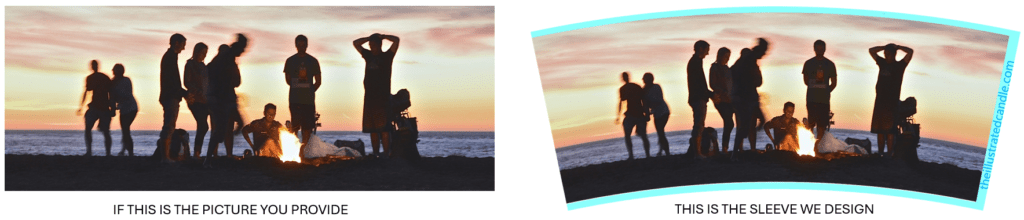
- To fit around a conical container a rectangular picture must be modified as shown above.
- The original picture must also be sufficiently high definition (>= 300 PPI and >= 22cm wide) to cover the surface of the container with a good quality printed image.
- It must also have an aspect ratio that is compatible with the container dimensions.
- The exact source image aspect ratio for this container is 1 wide by 0.38 high.
- If possible send us the file of the original picture and a file of the cropped image that you want to fit on the candle.
- We will make the best cropped fit with minimum possible distortion to achieve the required aspect ratio.
- Consider that with patterns or landscapes some change in aspect ratio is OK but with people and familiar objects this is more difficult.